

|
Fantasy writing has a software problem.
Not because there are not enough tools. There are hundreds. The problem is that most writing software was built for a simple novel. Three characters. One city. A story you can hold in your head.
Fantasy does not work like that.
You are tracking families across four kingdoms. You have named forty characters and need to remember which ones have ever met. Your magic system has rules you set up in chapter two that will matter again in chapter twenty-nine. And somewhere in your notes is a detail about the northern palace that you are pretty sure you already got wrong two chapters ago.
Regular writing software does not fix this. It just gives you a bigger blank page.
This guide is about the tools that actually help.
What Fantasy Writers Need That Other Writers Do Not
Fantasy puts special demands on your tools. Here is what actually matters:
Big casts. A regular novel might have five named characters. An epic fantasy often has fifty. Your brain cannot keep track of that many people on its own.
Relationship webs. Characters have history with each other. Sides change. Betrayals happen. Keeping track of who knows what, and who hates whom, gets hard fast across a long book.
World rules. Magic systems, governments, maps, history. These need to stay the same from page one to page four hundred. One mistake and your readers will notice before you do.
Timelines. Things happen in a certain order in your story world. That order has to be right whether you are on chapter five or chapter forty-five.
Most free writing tools do not try to handle these things. A few come close. One was built for exactly this.
Quick Look: Best Free Writing Software for Fantasy Writers
Tool | Character Tracking | World Notes | Relationship Map | Price |
Google Docs | None | None | None | Free |
Manuskript | Character profiles | World panel | No | Free |
Notion | Manual setup | Manual setup | No | Free tier |
World Anvil | Templates | Very detailed | Limited | Free tier |
Writeo | Built-in | Built-in | Visual map | Free tier |
Google Docs
If you want to start writing today, open this
Most fantasy novels start here. A lot of them finish here too.
There is nothing to download, nothing to learn, and nothing between you and your first sentence. It saves your work every few seconds. You can pull it up on your phone, your laptop, or a library computer. You can send a link to a beta reader and they can leave comments right in the document.
For a first draft with a small world and a handful of characters, this is genuinely enough. The advice here is simple: do not let software stop you from writing chapter one.
The wall appears later. Around chapter twenty, when you have fifteen characters and your timeline is split across four documents, things start falling apart quietly. A character shows up who you forgot you killed. A city changes its name between chapters. The magic system forgets its own rules. Google Docs cannot catch any of that because it does not know your story. It just holds your words.
What you get:
Opens in any browser, on any device
Saves automatically every few seconds
One click to share with readers or editors
Comments and suggestions built in
Free with any Google account
|
|
Manuskript
For the writer who plans the whole world before chapter one
Manuskript is free, open-source software made specifically for novelists. No subscriptions, no paid upgrades, no trial period. It runs on Windows, Mac, and Linux.
The whole tool is built around one idea: figure out your story before you write it. It uses the Snowflake Method, which starts with a single sentence and slowly builds outward. One sentence becomes a paragraph. A paragraph becomes a page. Your characters get developed question by question, starting with what they want most and what they fear most. Your plot gets structured scene by scene before you write a word of prose.
For fantasy writers who need to map a world before they can write it, this is one of the most useful free tools available. The world panel gives you a dedicated space for locations, groups, lore, and history. The outliner lets you see your whole story structure and drag sections around until the shape feels right. The plot tools link characters to specific events so you never lose track of who is involved in what.
What you get:
Step-by-step novel building using the Snowflake Method
Character profiles with goals, fears, and motivation fields
A world panel for locations, groups, and lore
Plot tools that link characters to story events
Full outline with drag-and-drop structure
Distraction-free writing mode
Word count goals and session tracking
Completely free, always
|
|
Notion
If you love building systems, this is your tool
Notion is not a writing tool. It is a workspace app that fantasy writers have bent into one of the best worldbuilding environments available.
Here is what makes it work for fantasy specifically. You can build any kind of database you need. A character list with fields for magic abilities, loyalties, and which chapters they appear in. A location page for every place in your world that links to the faction that controls it, which links to the history of how they took power. An encyclopedia of your world that you can search in seconds. Writers who use Notion well often say it feels like their world actually exists somewhere outside their head.
Most of them write the actual chapters in a different app. Notion lives on the other screen as a reference, not as a writing environment.
What you get:
Build any system your world needs
Character databases with custom fields you choose
Linked pages for places, groups, and events
Timeline and plot tracking
Works on desktop, phone, and browser
Free version covers a full novel
|
|
World Anvil
When your lore is bigger than your story
World Anvil started as a tool for tabletop game masters and grew into the most detailed worldbuilding platform available for fiction writers. If your world has the kind of depth that takes years to build, this is the only free tool made to hold it.
The template system is what sets it apart. You get 25 ready-made templates covering every part of a fantasy world. Geography. Governments. Religions. Magic systems. Species. Historical events. Family trees. Every page you create can link to every other page. Your northern castle links to the family that owns it. That family links to the war that put them in power. That war links to the magic system that ended it. The whole thing becomes a fully connected guide to your world that you can search in seconds.
World Anvil also has a writing module called Manuscripts where you can draft your chapters right alongside your world notes. Your whole world bible is one click away while you write.
What you get:
25 worldbuilding templates for every part of a fantasy world
Interactive maps you can annotate with locations and notes
Historical timelines with parallel tracks
Family trees and character lineages
Fully linked world pages that connect to each other
Manuscripts writing module for drafting chapters
|
|
Writeo
The only free tool built around how fantasy actually works
Every other tool on this list was built for something else and adapted for fiction. WriteO was built from the start for writers managing complex stories with large casts and worlds that need to stay consistent.
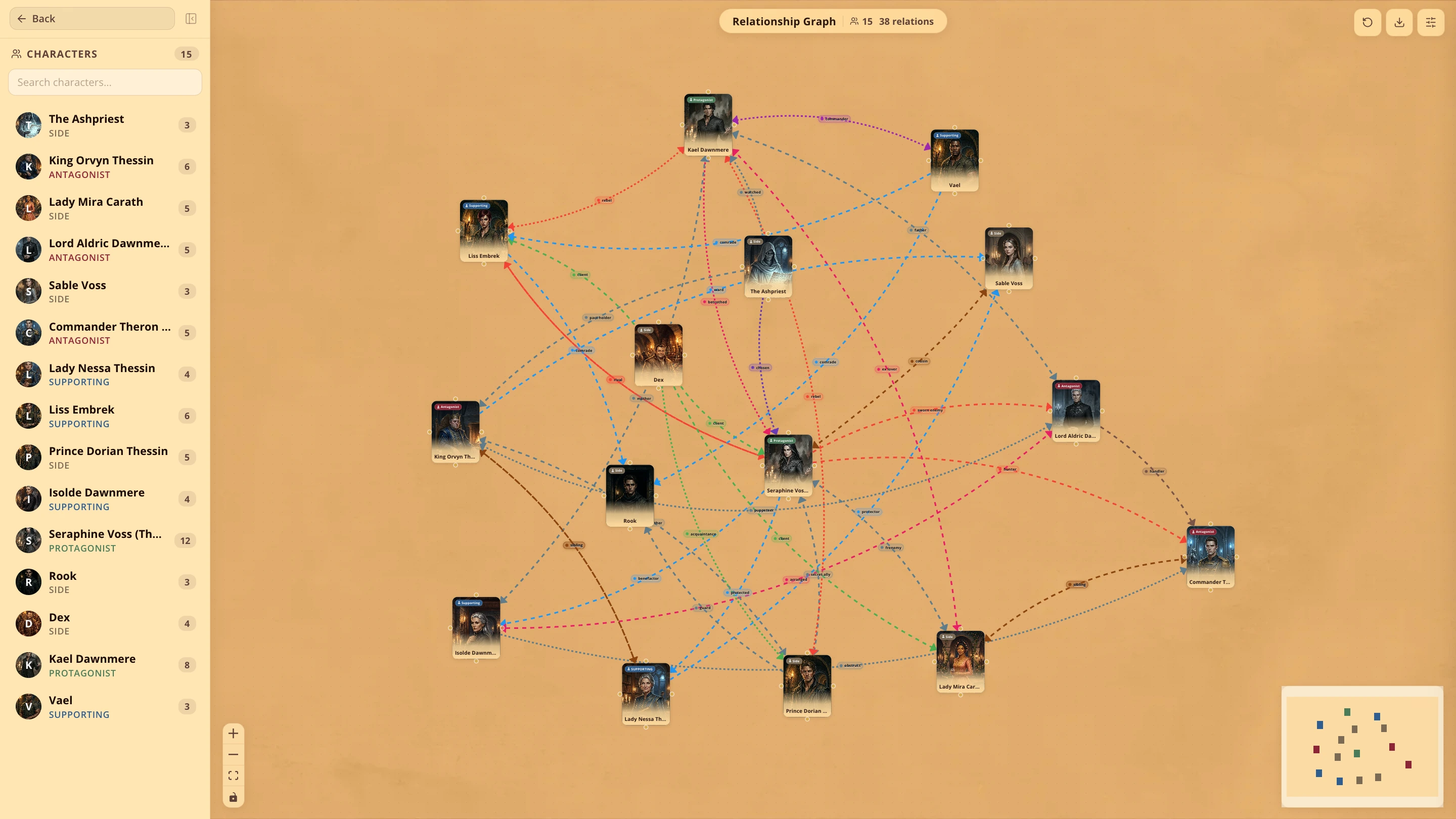
The Character Relationship Visualizer is the feature no other free tool has. Every character you add appears on an interactive map showing how they connect to every other character in your story. Relationships have types, strength levels, and a history log that tracks how they change chapter by chapter. When your enemies-to-lovers arc finally lands in chapter thirty, you have the whole journey logged behind it.
Everything lives in the same place as your actual writing. No separate wiki. No switching between apps. Your character profiles, relationship map, world notes, and chapter manager sit right alongside the words you are typing. You update them in the same session you write them.
As you write, the tool tracks which characters appear in which chapters on its own. Your world notes attach directly to your manuscript. You can build kingdoms, add maps, and link locations to your actual story. A writing dashboard shows your word count, daily streaks, and goals. There is a moodboard for saving images that match the look of your world.
What you get:
Full character profiles with looks, backstory, and personality
Character Relationship Visualizer that maps every connection as an interactive graph
Chapter-by-chapter character tracking that logs appearances as you write
World creation tools to build kingdoms, add maps, and link locations to your story
World notes tied directly to your manuscript
Writing dashboard with word count and streak tracking
Moodboard for saving visual ideas
Free tier: 2 novels, 50 chapters, full access to character and relationship features
|
|
Cost: Free tier available. Start at writeo.app.
So Which One Is Right for You?
Big cast, shifting relationships, multiple points of view: WriteO. The relationship map does what none of the other tools on this list even try.
You plan everything before you write: Manuskript. The step-by-step planning tools and world panel are built for writers who need the full picture before they start.
Your lore is the biggest challenge: World Anvil for building the world, then a separate tool for writing the actual chapters.
You love building custom systems: Notion with a fantasy novel template. Not from a blank page.
This is your first fantasy novel: Google Docs. Write the book. Deal with tools when the complexity actually demands it.
Frequently Asked Questions
QWhat do most fantasy authors actually use?
QIs Scrivener worth buying for fantasy?
QCan you write a full fantasy novel in Google Docs?
QWhat is the best free tool for tracking characters in a fantasy novel?
Stop Overthinking the Tools
Writing forty characters across four kingdoms is hard enough on its own.
Pick the tool that fits where you are right now. If the world is still small and you just need to start, open Google Docs and write. If you are a planner who needs the full map before chapter one, Manuskript gives you that structure. If your characters and their relationships are the heart of the story, Writeo was made for exactly that.
The best tool is the one you stop thinking about because the writing is going so well.